# Introduction

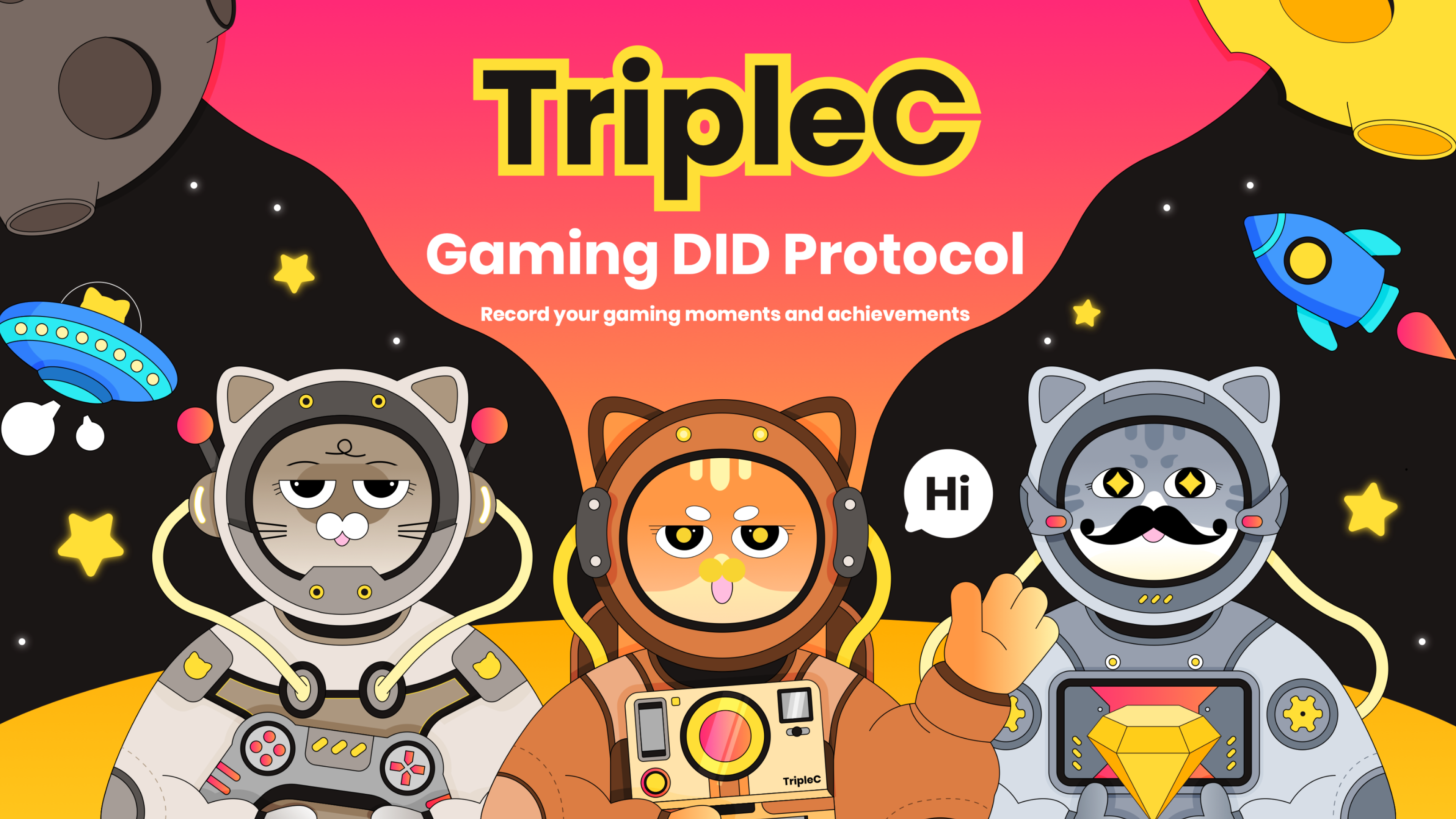
**TripleC** is a Torque Platform where real gamers **C**onverge, producers **C**onvert, and incentives **C**atalyze, with social and distribution propositions built in intrinsically and interoperably across Web3 chain-scapes.

{% embed url="<https://www.triplec.cc/>" %}

<figure><img src="https://2956447217-files.gitbook.io/~/files/v0/b/gitbook-x-prod.appspot.com/o/spaces%2F7pzJ02sN3Dzne4nG2JXO%2Fuploads%2FZVgYG4Q27kz1KXbCIY9h%2Fimage.png?alt=media&amp;token=8851f8f5-4a39-4f7c-bdc3-140df1efc99b" alt=""><figcaption></figcaption></figure>


# Missions

{% content-ref url="/pages/w9VpHCwa48P1CgXF1cTH" %}
[Gamers Converge](/overview/missions/gamers-converge)
{% endcontent-ref %}

{% content-ref url="/pages/G3LjhjPhSLMGvoEXUwB3" %}
[Producers Convert](/overview/missions/producers-convert)
{% endcontent-ref %}

{% content-ref url="/pages/STB3MObOfhLBtcbpO4ov" %}
[Incentives Catalyze](/overview/missions/incentives-catalyze)
{% endcontent-ref %}


# Gamers Converge

1. Game Discovery: TripleC offers a curated GameFi selection, using a specialized algorithm to match players to games based on their preferences, skills, and risk tolerance.
2. Recorded Gaming Journey: Through TripleC's Gaming DID Protocol (GID), players can permanently record and showcase their gaming journey in a decentralized way. Achievements in games are minted as on-chain badges, serving as proof of the players' dedication.
3. Contribute & Earn: Players can support the game ecosystem by donating tokens and in return, receive special in-game rewards and NFT badges that highlight their valuable contribution.
4. Community-driven game engagement: TripleC is not just a gaming platform but also a community-driven and diverse ecosystem. Players can engage in deep social interactions based on shared gaming interests and goals, such as sharing game strategies, forming teams, offering scholarships for newcomers, and participating in other community activities.


# Producers Convert

1. Precision User Targeting: TripleC uses advanced analytics to quickly match games with their ideal audience from our extensive user base.
2. Fund with GameStarter: TripleC's GameStarter organizes hackathons and bounty competitions focused on Web3 gaming, assisting quality startups in securing funding and blockchain support.
3. Robust Technical Support: The TripleC Academy has abundant developer resources including SDKs, API documentation, wallet support, and more. We also provide expert technical and marketing assistance for builders.


# Incentives Catalyze

1. For players, the GID protocol provides a trustworthy identity verification system, where all their contributions to the game will be permanently recorded in the form of NFT badges. These NFT rewards not only amplify player engagement and immersion but also introduce a distinctive value for their digital identity.
2. For developers, the GID protocol has designed an open developer toolkit, allowing any game developer to easily integrate and customize an achievement system within their games. This ensures widespread adoption of the GID protocol across different types of Web3 games, maximizing the value of the entire gaming landscape.


# Team

## Paul Lessells（CEO）

Paul Lessells is a seasoned telecom and entertainment executive with a wealth of management experience. He has held key positions at BT plc, including senior regional manager in the Caribbean and Asia, as well as managing director for the AT\&T/BT plc joint-venture. Paul's leadership has resulted in securing international business surpassing $US 2.5 billion. He has also served as Programme Manager and Principal Consultant for CP Group, playing a pivotal role in telecom M\&A activities. In addition, Paul has assumed the role of CEO at ROK Entertainment Group, a US-listed company specializing in live streaming and gaming. Paul is a Chartered Engineer and a member of the Engineering Council (UK).

***

## Tiger Fusa（Game）

Mr. Fusa is a serial entrepreneur with extensive experience in marketing and game publishing. He founded a successful game publishing and marketing company in Japan in 2018, partnered with big-name publishers such as NetEase and Tencent. Mr. Fang and his team have released several best-sellers, such as “LifeAfter”, “Identity V”, “Cyber Hunter” and “Daisangoku”. "Life After" was the number 1 download in Japan in 2019.

***

## Ryan (Engineering）

Ryan, a Peking University graduate and former Tencent developer, has extensive experience in product development. He achieved remarkable success by developing distributed network-related products with a million daily active users within a year. In the mobile gaming industry, he created a popular national-level game with high monthly revenue and a large user base. In 2017, Ryan transitioned to the blockchain industry, where he focused on developing various blockchain products such as wallets, DeFi, NFTs, and GameFi.

***

## Coralie Son (Marketing)

A Johns Hopkins University graduate, has 3 years of VC investment experience and 5 years in blockchain marketing and operations. She excelled in traditional VC, investing in digital currency exchanges. As COO of a DeFi project, she attracted 100,000 users and became a leading figure in the 2020 DeFi market. Elena has rich resources in Web3 game marketing and operations, having participated in incubating a Web3 game.


# Roadmap

## 2023 Q3

* [ ] Launch TripleC Gaming DID protocol&#x20;
* [ ] Social Campaign
* [ ] Institutional endorsements
* [ ] Integration with BSC

***

## 2024 Q1

* [ ] Launch Gamestarter&#x20;
* [ ] Gaming Hackathon to build a gaming ecosystem with different chain
* [ ] Launch early cat sale of TripleC OG member

***

## 2024 Q2

* [ ] Launch Academy: Enhancing Knowledge Support
* [ ] Development tool for Web2 game developers


# Gaming DID Protocol (GID) (Coming Soon)

{% hint style="info" %}
Empowering the Web3 gaming industry and initiating a new era of blockchain game marketing
{% endhint %}

The ***Gaming DID Protocol (GID)*** is a technology framework designed to introduce improved identity verification and management within the gaming industry. GID aims to enhance the gaming experience for both players and developers by providing a set of innovative features:

* For players, the GID protocol provides a trustworthy identity verification system, where all their contributions to the game will be permanently recorded in the form of NFT badges. These NFT rewards not only amplify player engagement and immersion but also introduce a distinctive value for their digital identity.
* For developers, the GID protocol has designed an open developer toolkit, allowing any game developer to easily integrate and customize an achievement system within their games. This ensures widespread adoption of the GID protocol across different types of Web3 games, maximizing the value of the entire gaming landscape.


# Badge System

<figure><img src="https://2956447217-files.gitbook.io/~/files/v0/b/gitbook-x-prod.appspot.com/o/spaces%2F7pzJ02sN3Dzne4nG2JXO%2Fuploads%2FLR89dzHbyP2bzHLvb22s%2Fimage.png?alt=media&amp;token=0fd7c48a-30c5-4bf9-bd97-06722320f74d" alt=""><figcaption></figcaption></figure>

The ***Badge system*** is the first feature to be launched on the TripleC platform, intending to dismantle the market barriers existing between various GameFi projects. By collaborating with different types of GameFi projects, both TripleC and the participating projects can access a broader spectrum of player communities, thereby amplifying their competitive edge in the market.

***

## About CAT BADGE

Introducing CAT BADGE – your key to unlocking a world of gaming achievements on the TripleC platform. CAT BADGE is more than just a digital emblem; it's a verifiable proof of your gaming accomplishments, and it stands as a cornerstone of TripleC's Web3 achievement system.

Every time you immerse yourself in the diverse gaming experiences available on TripleC, your achievements are meticulously recorded on the blockchain. These achievements are then transformed into CAT BADGES, which you can proudly display on your profile. Each CAT BADGE tells a captivating story of your gaming adventures and accomplishments.

***

## Types of Badges

Cat badges are divided into three types: game badges, event badges, and CAT KEY.

### **1. Game Badges - GCB**

Game badges, short for Gaming Cat Badges, represent the achievement records of users in games available on the TripleC platform. Currently, each type of game badge has five levels. Players can unlock higher levels by completing specific actions a certain number of times in the game and claiming them on the TripleC platform.

### **2. Event Badges - ECB**

Event badges, known as Event Cat Badges, are badges that users receive after completing designated activities on TripleC. Currently, event badges are primarily at level 1. If there are paid events in the future, the level of event badges will increase.

### 3. Cat Key (CK)

Cat Key is a special event badge issued by TripleC and is related to the later OG identity. Users need to collect Cat Keys dropped in different activities to obtain the OG identity


# GameStarter (Coming soon)

{% hint style="info" %}
The Crowdfunding Hub for Web3 Startups
{% endhint %}

GameStarter: a hackathon community specialized in the Web3 gaming industry

GameStarter, the premier community for Web3 gaming, brings together innovators, developers, and enthusiasts through captivating hackathons and thrilling bounty competitions. Our mission is to empower high-quality startups by providing them with the necessary resources to secure grant and capture the attention of public blockchains. With GameStarter, project teams can strategically choose the competition that aligns with their unique developmental stage and requirements.  Join GameStarter and unleash the full potential of your gaming project!


# Academy (Coming soon)

{% hint style="info" %}
Empowering Game Developers for the Web3 Era
{% endhint %}

The ***Academy*** is a curated resource hub for developers migrating from Web2 to Web3 landscapes. It covers a wide range of topics, from basic concepts to advanced practices, aiming to address the technical challenges developers may encounter during the development process. Its goal is to accelerate the development and launch of Web3 games by providing developers with the necessary technical support.


# $3C

## Governance Token

* Name: TripleC Token
* Symbo&#x6C;**:** $3C

***

## What is **$3C**?

**$3C**, the native token circulating within the product matrix, serves as a critical foundation in Tokenomics. $3C holders will benefit from the development of the whole TripleC ecosystem.

***

## Token Utilities

* Governance
* Incentives for game developers and players
* Access to mystery boxes, equipment, and perks across 3C gameverse
* Membership premium benefits are based on the $3C possession


# Allocation

Total Supply (100%): 1,000,000,000 $3C

<figure><img src="https://2956447217-files.gitbook.io/~/files/v0/b/gitbook-x-prod.appspot.com/o/spaces%2F7pzJ02sN3Dzne4nG2JXO%2Fuploads%2FbhiQ0tA4id2DoSI240TH%2F3c.png?alt=media&amp;token=c1d30b39-72a5-471d-9ad6-74cac4c44e94" alt=""><figcaption></figcaption></figure>

<table><thead><tr><th width="429">Segment</th><th width="173.33333333333331">Allocation</th><th></th></tr></thead><tbody><tr><td>Investors</td><td>150,000,000</td><td>15%</td></tr><tr><td>Team and Advisors</td><td>200,000,000</td><td>20%</td></tr><tr><td>DAO Treasury</td><td>250,000,000</td><td>25%</td></tr><tr><td>Partnered Games &#x26; Relevant Services</td><td>250,000,000</td><td>25%</td></tr><tr><td>Community &#x26; Marketing</td><td>120,000,000</td><td>12%</td></tr><tr><td>Public Distribution</td><td>30,000,000</td><td>3%</td></tr></tbody></table>


# Add the opBNB Network

## Wallet configuration

You can use any Etheruem or BSC wallet with opBNB. For instance, I will show you how to set up Metamask for opBNB.

To configure your wallet to work with opBNB, you will need to add both the BNB Smart Chain (Layer 1) and the opBNB network (Layer 2).

Follow these steps:

### **1. Add the BNB smart chain to your wallet.**

#### **This is the Layer 1 blockchain that opBNB is built on top of.**[**​**](https://docs.bnbchain.org/opbnb-docs/docs/build-on-opbnb/wallet-configuration#mainnet)

* Network Name: BSC Mainnet
* RPC URL: [https://bsc.nodereal.io](https://bsc.nodereal.io/)
* ChainID: 56
* Symbol: BNB
* Explorer: <https://bscscan.com/>

### **2. Add the opBNB network to your wallet.**[**​**](https://docs.bnbchain.org/opbnb-docs/docs/build-on-opbnb/wallet-configuration#mainnet-1)

* Network Name: opBNB Mainnet
* RPC URL: [https://opbnb-mainnet-rpc.bnbchain.org](https://opbnb-mainnet-rpc.bnbchain.org/)
* ChainID: 204
* Symbol: BNB
* Explorer: <http://opbnbscan.com/>

***

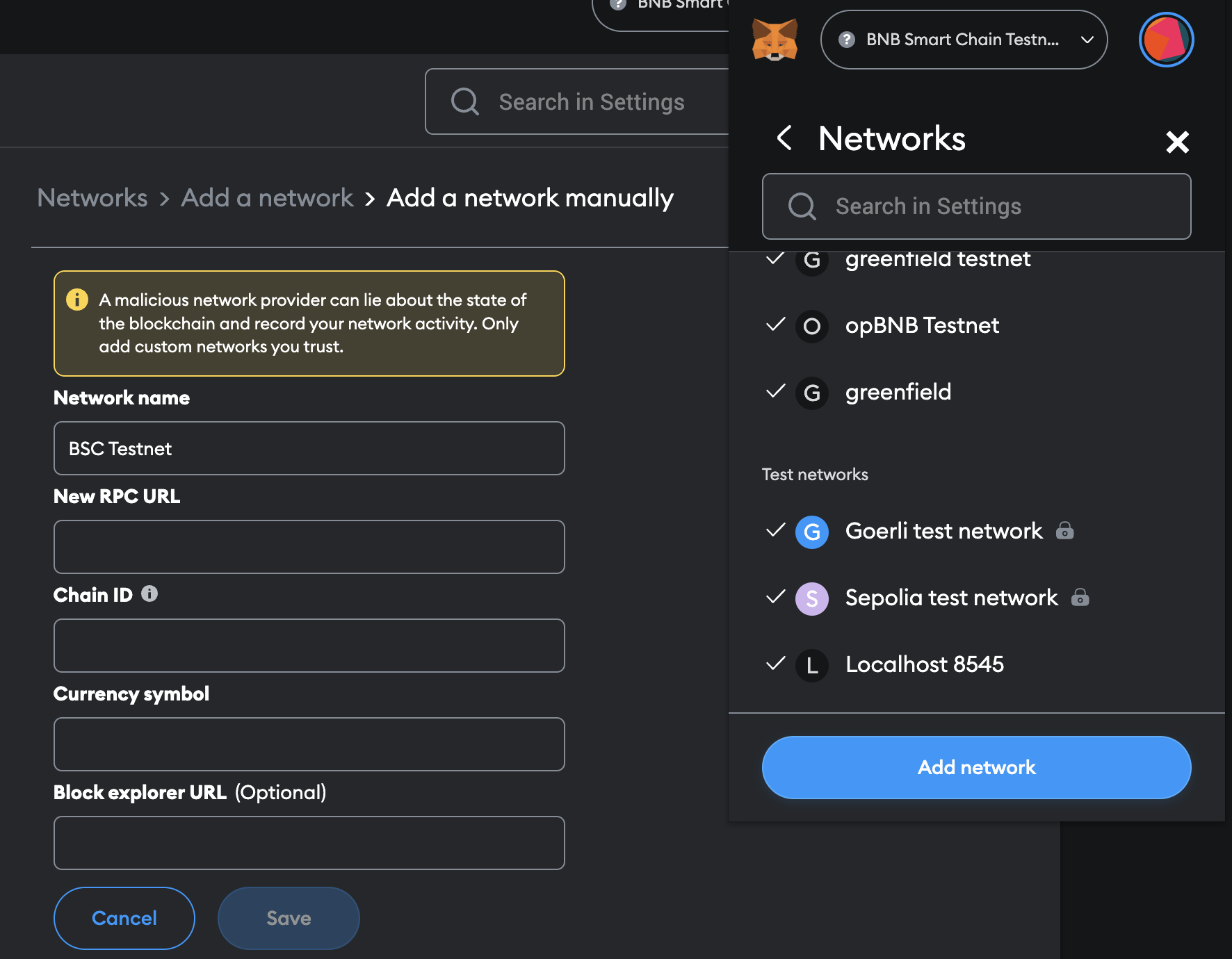
## How to configure Metamask[​](https://docs.bnbchain.org/opbnb-docs/docs/build-on-opbnb/wallet-configuration#references---how-to-configure-trustwallet-or-metamask) <a href="#references---how-to-configure-trustwallet-or-metamask" id="references---how-to-configure-trustwallet-or-metamask"></a>

1. Install [MetaMask](https://chrome.google.com/webstore/detail/metamask/nkbihfbeogaeaoehlefnkodbefgpgknn)
2. After you install the metamask in your browser, you can go to \[Settings] -> \[Networks] -> \[Add Network] page.
3. Select add manual network and enter the network information.

<figure><img src="https://docs.bnbchain.org/opbnb-docs/assets/images/add-bsc-metamask-053c0819ca959d102e95ea17118443eb.png" alt=""><figcaption></figcaption></figure>

### opBNB Network Information[​](https://docs.bnbchain.org/opbnb-docs/docs/build-on-opbnb/opbnb-network-info#opbnb-network-information) <a href="#opbnb-network-information" id="opbnb-network-information"></a>

<table><thead><tr><th width="278">Name</th><th>Value</th></tr></thead><tbody><tr><td>Network Name</td><td>opBNB</td></tr><tr><td>Description</td><td>The Layer 2 network of BNB Smart Chain.</td></tr><tr><td>RPC Endpoint</td><td><a href="https://docs.bnbchain.org/opbnb-docs/docs/build-on-opbnb/opbnb-network-info#opbnb-rpc-endpoints">See here</a></td></tr><tr><td>Chain ID</td><td>5611(Testnet), 204(Mainnet)</td></tr><tr><td>Currency Symbol</td><td>tBNB(Testnet) BNB(Mainnet)</td></tr><tr><td>Block Explorer</td><td><a href="https://testnet.opbnbscan.com/">https://testnet.opbnbscan.com</a>, <a href="https://opbnbscan.com/">https://opbnbscan.com</a>, <a href="https://bscscan.com/">https://bscscan.com</a></td></tr><tr><td>Bridge</td><td><a href="https://opbnb-testnet-bridge.bnbchain.org/">https://opbnb-testnet-bridge.bnbchain.org</a>, <a href="https://opbnb-bridge.bnbchain.org/">https://opbnb-bridge.bnbchain.org</a></td></tr></tbody></table>

### opBNB RPC Endpoints[​](https://docs.bnbchain.org/opbnb-docs/docs/build-on-opbnb/opbnb-network-info#opbnb-rpc-endpoints) <a href="#opbnb-rpc-endpoints" id="opbnb-rpc-endpoints"></a>

You can use either public and private RPC endpoints to access opBNB.

**Public opBNB Mainnet RPC Endpoints(WSS is supported)**[​](https://docs.bnbchain.org/opbnb-docs/docs/build-on-opbnb/opbnb-network-info#public-opbnb-mainnet-rpc-endpointswss-is-supported)

* [https://opbnb-mainnet-rpc.bnbchain.org](https://opbnb-mainnet-rpc.bnbchain.org/)
* <https://opbnb-mainnet.nodereal.io/v1/64a9df0874fb4a93b9d0a3849de012d3>
* <https://opbnb-mainnet.nodereal.io/v1/e9a36765eb8a40b9bd12e680a1fd2bc5>

**Private opBNB RPC Endpoints**[​](https://docs.bnbchain.org/opbnb-docs/docs/build-on-opbnb/opbnb-network-info#private-opbnb-rpc-endpoints)

NodeReal supports the opBNB network, you can create your free opBNB RPC endpoints with your github or discord.

* <https://nodereal.io/api-marketplace/opbnb-rpc>

**NOTE**

To use the above private RPC endpoint, make sure to login to [MegaNode service](https://nodereal.io/meganode) and create your private endpoints.


# Deposit BNB to opBNB

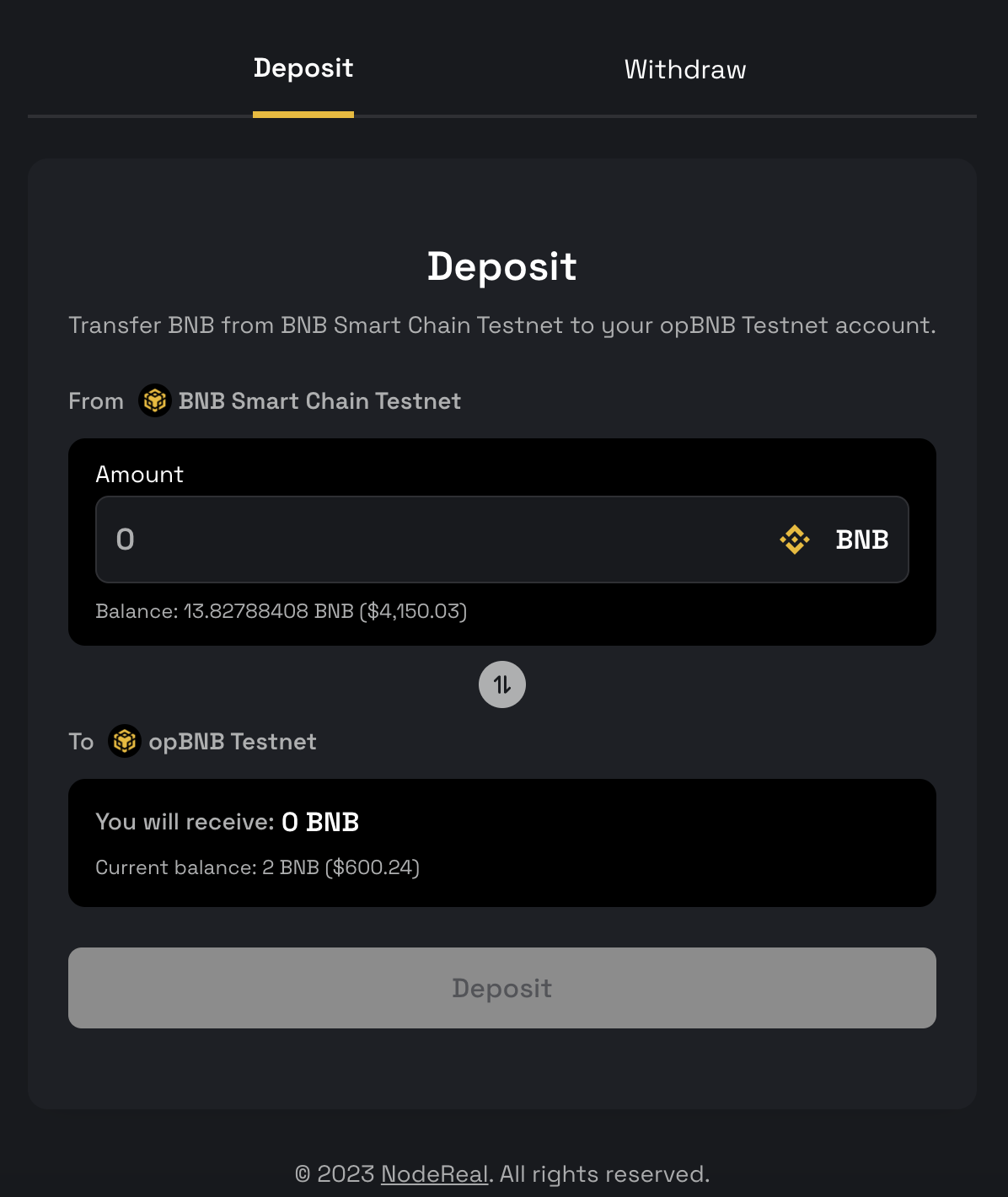
Before you use the opBNB network, you must first deposit BNB as your gas token from BNB Smart Chain to opBNB.

**You can do this using the** [**opBNB bridge dApp(Mainnet)**](https://opbnb-bridge.bnbchain.org/)**.**

***

## Follow these steps to deposit tokens from BNB Smart Chain to opBNB:

1\) Make sure you have BNB tokens in your wallet on the BNB Smart Chain.

2\) In your wallet, switch your network to BNB Smart Chain. This is the Layer 1 network where your tokens currently are.

3\) Enter the amount of BNB you want to deposit to the opBNB network.

4\) Click "Deposit" to begin the transfer.

5\) Your wallet will prompt you to confirm the transaction. Click "Confirm" to sign it and pay the required gas fee.

6\) Once the transaction is processed, switch your network in your wallet to opBNB. The BNB amount you have deposited will appear in your wallet.

7\) You can now build, deploy, and interact with dApps on the opBNB network using the BNB you deposited.

* To withdraw tokens from opBNB back to BNB Smart Chain, simply go to the bridge, enter the amount to withdraw, and confirm the transaction. The bridge will transfer your tokens from the opBNB network back to the BNB Smart Chain.

<figure><img src="https://docs.bnbchain.org/opbnb-docs/assets/images/opBNB-bridge-b92ea5d873c4b53b5b63dcff079775e0.png" alt=""><figcaption></figcaption></figure>


# Claim Cat Badges

This tutorial will guide you on how to claim badges on opBNB. Before proceeding, ensure that your network is switched to opBNB, and you have sufficient BNB in your wallet to cover the gas fees.

Visit: <https://www.triplec.cc/mybadges>

***

## Step 1: Switch Network to opBNB

Make sure your wallet is connected to the opBNB network. Access the network settings in your wallet and select opBNB as the active network.

***

## Step 2: Connect Wallet and Access My Badges

On the website, locate and click on the "Connect Wallet" button. Choose your wallet from the available options and authorize the connection. Once connected, navigate to the "My Badges" section.

<figure><img src="https://2956447217-files.gitbook.io/~/files/v0/b/gitbook-x-prod.appspot.com/o/spaces%2F7pzJ02sN3Dzne4nG2JXO%2Fuploads%2FOHNQWITojfHPb8V7e48A%2Fimage.png?alt=media&amp;token=6688bbec-a453-4cad-b4df-7e11467489bd" alt=""><figcaption></figcaption></figure>

***

## Step 3: Check Claimable Badges

In the "My Badges" section, you will see a list of badges. Look for badges that are in the "Claim" status. These are the badges you can claim.

<figure><img src="https://2956447217-files.gitbook.io/~/files/v0/b/gitbook-x-prod.appspot.com/o/spaces%2F7pzJ02sN3Dzne4nG2JXO%2Fuploads%2FTk993P2BXdGdRu3bU3Es%2Fimage.png?alt=media&amp;token=c152e2c6-98f0-45bb-8de8-c4c7339b12e4" alt=""><figcaption></figcaption></figure>

***

## Step 4: Claim Badges

Click on the "Claim" button next to the desired badge. A confirmation prompt may appear, asking you to confirm the claim. Once confirmed, the badge will be claimed and added to your collection.


# Brand & Logos

## Brand Color

<figure><img src="https://2956447217-files.gitbook.io/~/files/v0/b/gitbook-x-prod.appspot.com/o/spaces%2F7pzJ02sN3Dzne4nG2JXO%2Fuploads%2F1OVzvq0A1GvK0TU5K9XF%2Fimage.png?alt=media&amp;token=56216560-f3f0-4da5-9da9-6011b246203c" alt=""><figcaption></figcaption></figure>

***

## LOGO

### Logo files

{% file src="/files/ydgbFXAb8NBpNhlI4DhT" %}

### Logo security scope

<figure><img src="https://2956447217-files.gitbook.io/~/files/v0/b/gitbook-x-prod.appspot.com/o/spaces%2F7pzJ02sN3Dzne4nG2JXO%2Fuploads%2F9JsjQYOBtVAQ0c5muhS0%2Fimage.png?alt=media&amp;token=fd579ed3-f87e-4c91-b8e6-0696978186dd" alt=""><figcaption></figcaption></figure>

### Use of the logo in various contexts

<figure><img src="https://2956447217-files.gitbook.io/~/files/v0/b/gitbook-x-prod.appspot.com/o/spaces%2F7pzJ02sN3Dzne4nG2JXO%2Fuploads%2F77WysWPInzopzFq33csG%2Fimage.png?alt=media&amp;token=42401be2-44e8-461f-9357-6e2c93655b36" alt=""><figcaption></figcaption></figure>